
Setting up your Express Entry profile opens the door to permanent residency in Canada through a competitive, points-based system.
Many skilled professionals see this as their clearest path, yet the process involves careful preparation and attention to detail.
A well-built profile boosts your chances in the pool, where candidates receive invitations based on their Comprehensive Ranking System (CRS) score.
This guide walks through every stage with practical steps, common pitfalls, and tips to help you move forward confidently.
Core Checklist: Mandatory Prerequisites Before Clicking “Start”
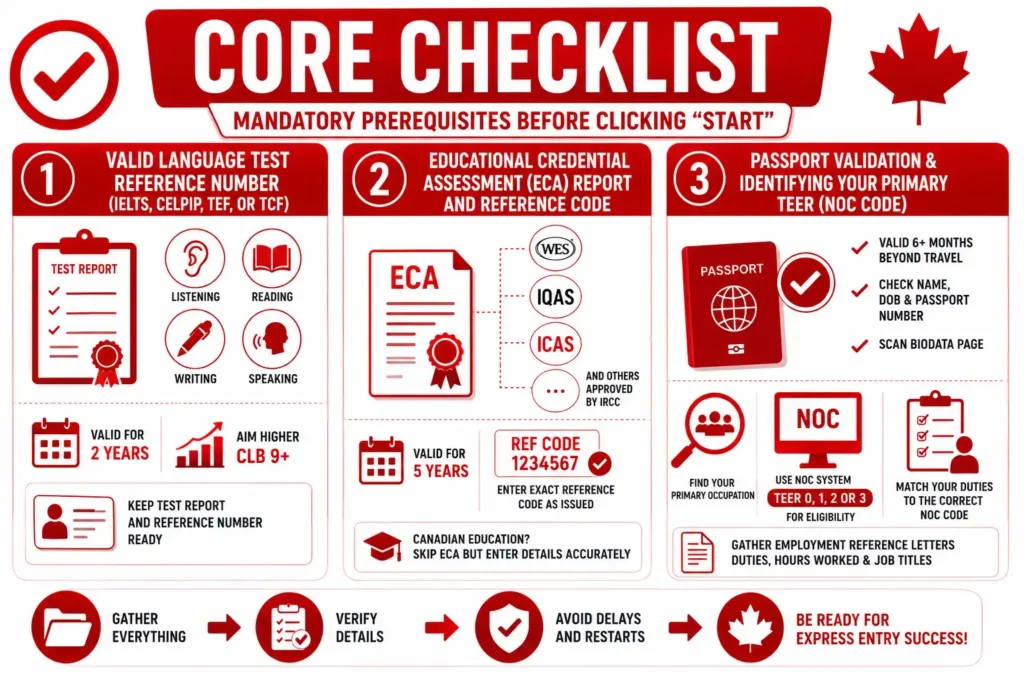
Gather these documents and reports first. Missing any item can delay the entire process or force a restart.
Valid Language Test Reference Number (IELTS, CELPIP, TEF, or TCF)
Language proficiency counts heavily toward your CRS score. Choose an approved test: IELTS General Training or CELPIP for English, and TEF Canada or TCF Canada for French. Results stay valid for two years from the test date.
Enter exact scores for each module (Listening, Reading, Writing, Speaking) because the system converts them to Canadian Language Benchmark (CLB) levels automatically.
Aim higher than the minimum, stronger results add significant points, especially for CLB 9 or above. Keep the official test report handy, as you will need the reference number during profile creation.
Educational Credential Assessment (ECA) Report and Reference Code
If your education was completed outside Canada, obtain an ECA from a designated organization such as WES, IQAS, ICAS, or others approved by IRCC.
The report must confirm your credentials match a Canadian standard. The ECA remains valid for five years. Note the reference number carefully, because the profile form requires it exactly as issued. For Canadian education, skip this step but still enter details accurately.
Passport Validation and Identifying Your Primary TEER NOC Code
Ensure your passport remains valid for at least six months beyond your planned travel. Scan the biodata page for accurate name spelling, date of birth, and passport number. Next, determine your primary occupation using the National Occupational Classification (NOC) system.
Focus on TEER 0, 1, 2, or 3 categories for eligibility. Match your real duties to the correct NOC code, IRCC checks this closely during verification. Gather employment reference letters that clearly describe responsibilities, hours worked, and job titles.
The 60-Day Clock and Why Pre-Mapping Matters
Once you start the profile, IRCC gives exactly 60 days to complete and submit it. After that deadline, the system deletes any unfinished work, forcing a full restart. This tight window explains why preparation matters so much.
Create a checklist, gather all documents, and draft answers in a separate file before logging in. Pre-mapping your information reduces errors and stress.
Many applicants lose progress because they begin without complete details, especially in work history or education sections. Treat the 60 days as a firm project deadline rather than flexible time.
How the Express Entry Pools Work
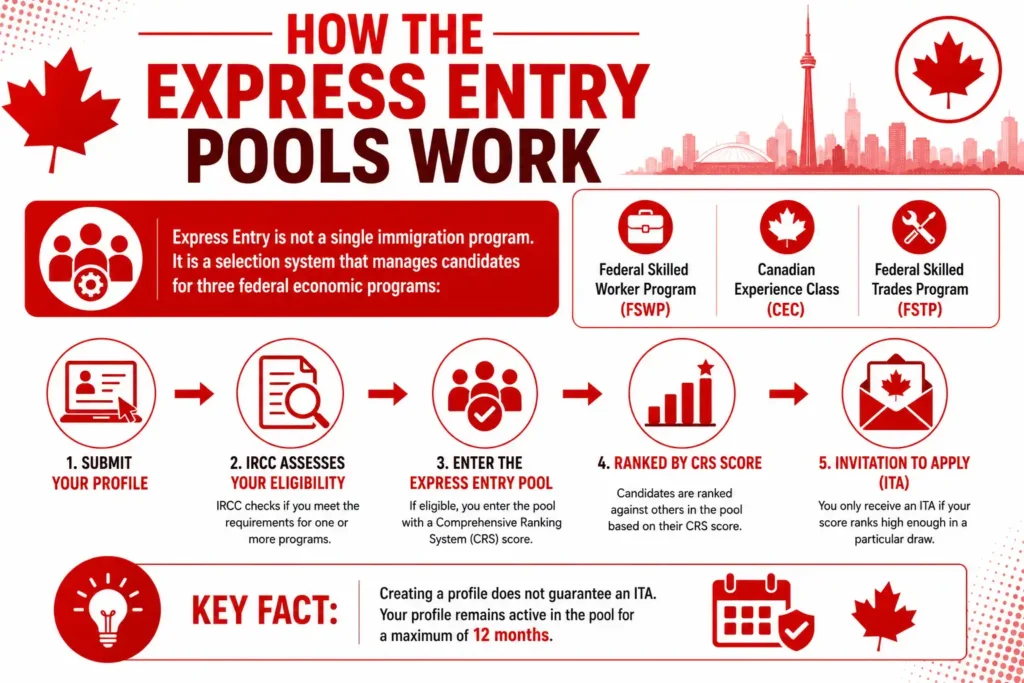
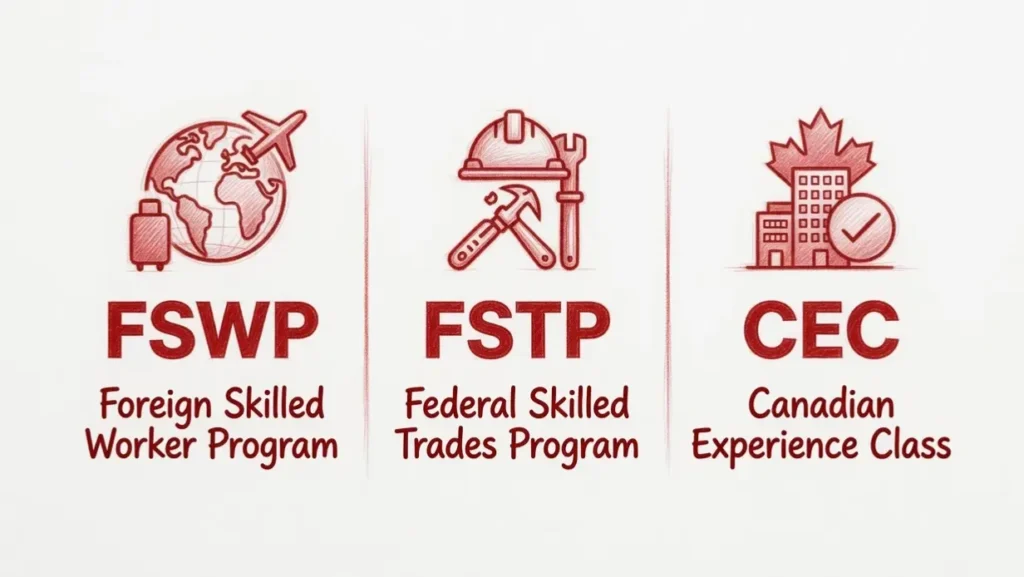
Express Entry is not a single immigration program. It is a selection system that manages candidates for three federal economic programs:
- Federal Skilled Worker Program (FSWP)
- Canadian Experience Class (CEC)
- Federal Skilled Trades Program (FSTP)
After you submit your profile, IRCC assesses your eligibility. If you qualify for one or more programs, you enter the Express Entry pool with a Comprehensive Ranking System (CRS) score.
You only receive an Invitation to Apply (ITA) if your score ranks high enough in a particular draw.
Key Fact: Creating a profile does not guarantee an ITA. Your profile remains active in the pool for a maximum of 12 months.
Program Invitation Order
If you qualify for multiple programs, IRCC invites candidates in this strict order:
- Canadian Experience Class (CEC)
- Federal Skilled Worker Program (FSWP)
- Federal Skilled Trades Program (FSTP)
You cannot choose the program yourself. If you decline an ITA, you return to the pool and the same invitation order applies for future draws.
Express Entry Required Documents – Official Preparation List
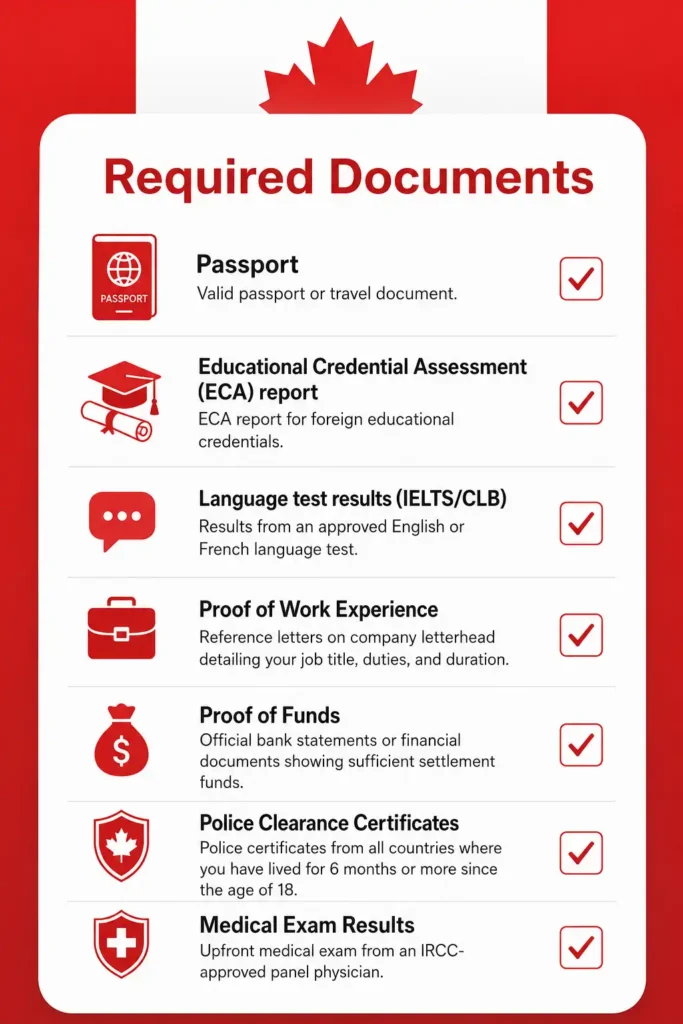
Gather these documents before starting your profile:
- Valid passport or travel document (valid for at least 6 months recommended)
- Language test results (IELTS, CELPIP, TEF, or TCF) with official reference number
- Educational Credential Assessment (ECA) report (for education outside Canada)
- Proof of work experience (reference letters on company letterhead)
- Proof of funds (if required)
- Marriage/common-law certificate and partner details (if applicable)
- Digital photos (if requested)
All details you enter must match your documents exactly. Any mismatch can cause delays, refusal, or a 5-year ban.
Step 1: Navigating the Official IRCC Secured Online Account Portal
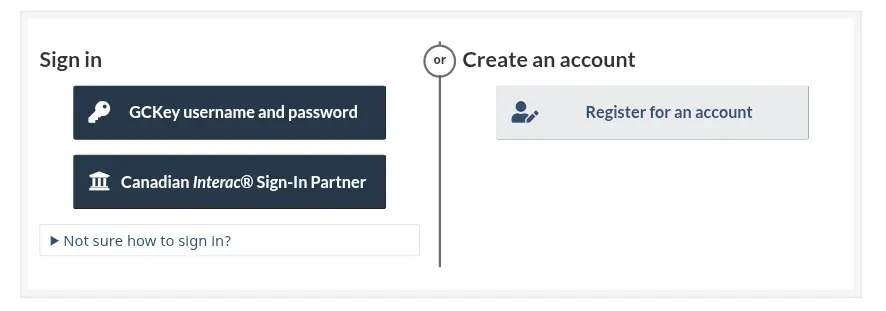
All Express Entry activity happens through the official IRCC secure account. Avoid third-party sites that promise faster access.
Creating a Secure GCKey Username and Password
Visit the IRCC website and select the option to create a GCKey. Provide basic personal information, choose a strong username, and set a memorable yet secure password.
Complete the security questions and recovery options. This account serves as your permanent dashboard for profiles, applications, and updates. Save login details safely, many users face delays from forgotten credentials.
Alternative: Setting Up Access via a Canadian Sign-In Partner
If you prefer, link through a participating Canadian bank or financial institution. This method often feels faster for those with existing accounts in Canada.
Choose your bank, authenticate through their portal, and grant IRCC limited access. Both GCKey and Sign-In Partner options lead to the same dashboard.
Step 2: Generating Your Unique Personal Reference Code
Passing the Initial Online Eligibility Questionnaire
After signing in, select Express Entry and answer the Come to Canada tool questions or the built-in eligibility questionnaire.
The system evaluates your age, education, language scores, work experience, and other factors to confirm eligibility for at least one program (Federal Skilled Worker, Canadian Experience Class, or Federal Skilled Trades).
Answer honestly, false information can lead to refusal or a five-year ban. If eligible, the system generates your personal reference code.
Saving Your Code to Link Your Express Entry Profile Shell
Copy and securely save the reference code immediately. It links your answers to the full profile form. Without it, you cannot proceed smoothly. The code acts as a bridge between the eligibility check and the detailed application.
Step 3: Filling Out the Express Entry Form (Section-by-Section Walkthrough)
The main form demands precision. Work section by section and save frequently.
Personal Details and Marital Status Declaration
Enter your full legal name exactly as it appears on your passport. Include any aliases or previous names. Provide date of birth, country of birth, citizenship, and current marital status.
For common-law or married applicants, include partner details if they will accompany you. Accuracy here prevents identity mismatches later.
Contact Details and Passport Identity Field Inputs
Add current address, phone number, and email. Use an address you can access reliably. In the identity section, input passport details carefully, number, issue date, expiry date, and country of issuance. Double-check every digit and date.
Study History: Inputting ECA Credentials and Issuing Dates
List all post-secondary education. For foreign credentials, enter the ECA reference number, issuing organization, and date. Specify the level of education (e.g., Bachelor’s, Master’s) and field of study. The system uses this for education points in your CRS score.
Language Capabilities: Entering Individual Section Scores (CLB Mapping)
Input results for each language test taken. The form asks for scores in all four abilities. It automatically calculates CLB levels and assigns points. Add results for both English and French if available, bilingualism provides extra points. Upload or note the test reference numbers.
Getting the “Work History” Section Right to Avoid Rejection
This section receives heavy scrutiny. Errors here commonly cause profile issues.
Matching Your Real-World Job Duties to the Correct TEER Code
For each job, select the NOC code that best matches your actual duties, not just the title. Provide reference letters on company letterhead with clear descriptions. List positions from the last 10 years, focusing on skilled roles. Include start and end dates, hours per week, and salary.
Declaring Continuous Foreign Work vs. Non-Continuous Canadian Experience
Specify whether experience was gained in Canada or abroad. Canadian experience earns additional points under certain programs. Be transparent about gaps, explain them if needed in supporting documents later. The system calculates points based on the duration and recency of skilled work.
Declaring Relatives in Canada and Intended Province Details
Mention any close relatives in Canada (citizens or permanent residents). Choose your preferred province or territory of settlement. This information can influence provincial nomination opportunities.
Step 4: Final Review, Digital Signature, and Official Pool Submission
Checking the Validation Status of All Form Modules
Before submission, review every section for validation checks. The system flags missing or inconsistent information. Fix errors until all modules show as complete. Pay close attention to proof of funds declaration, which must meet current IRCC minimums.
Receiving Your Official Express Entry Profile Number and Job Seeker Validation Code
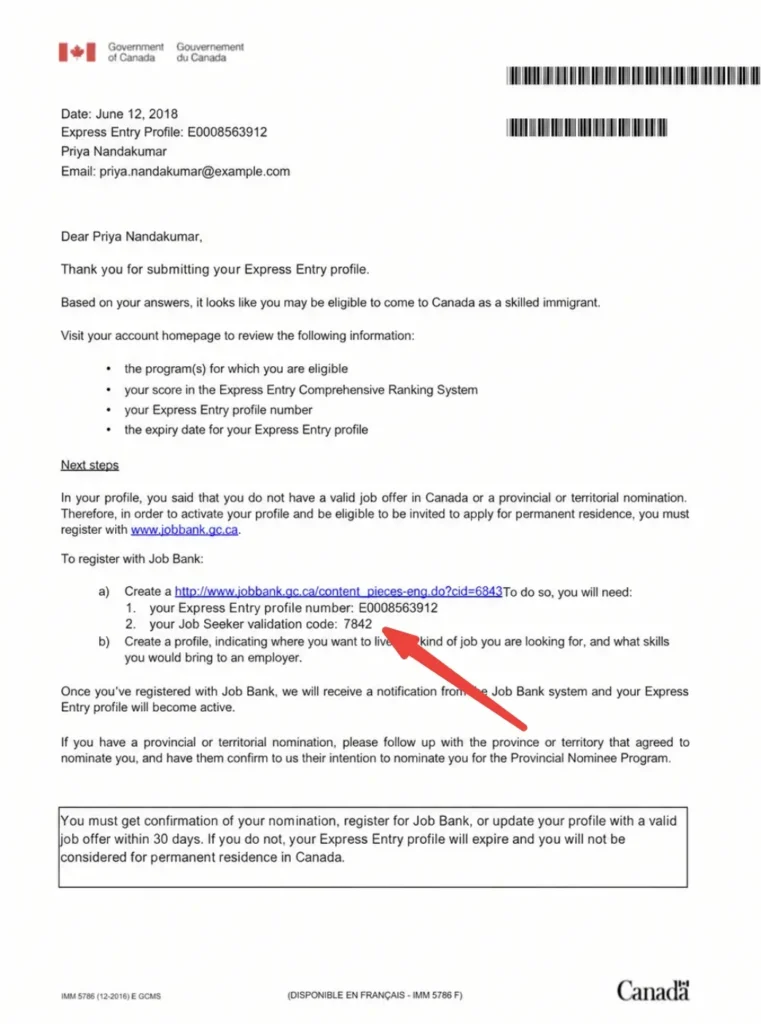
Upon successful submission, you receive a profile number and enter the pool. The system calculates your CRS score instantly. You also get a Job Seeker validation code for the Job Bank if desired. Save all confirmation emails and numbers.
Step-by-Step Official Process to Create Your Profile
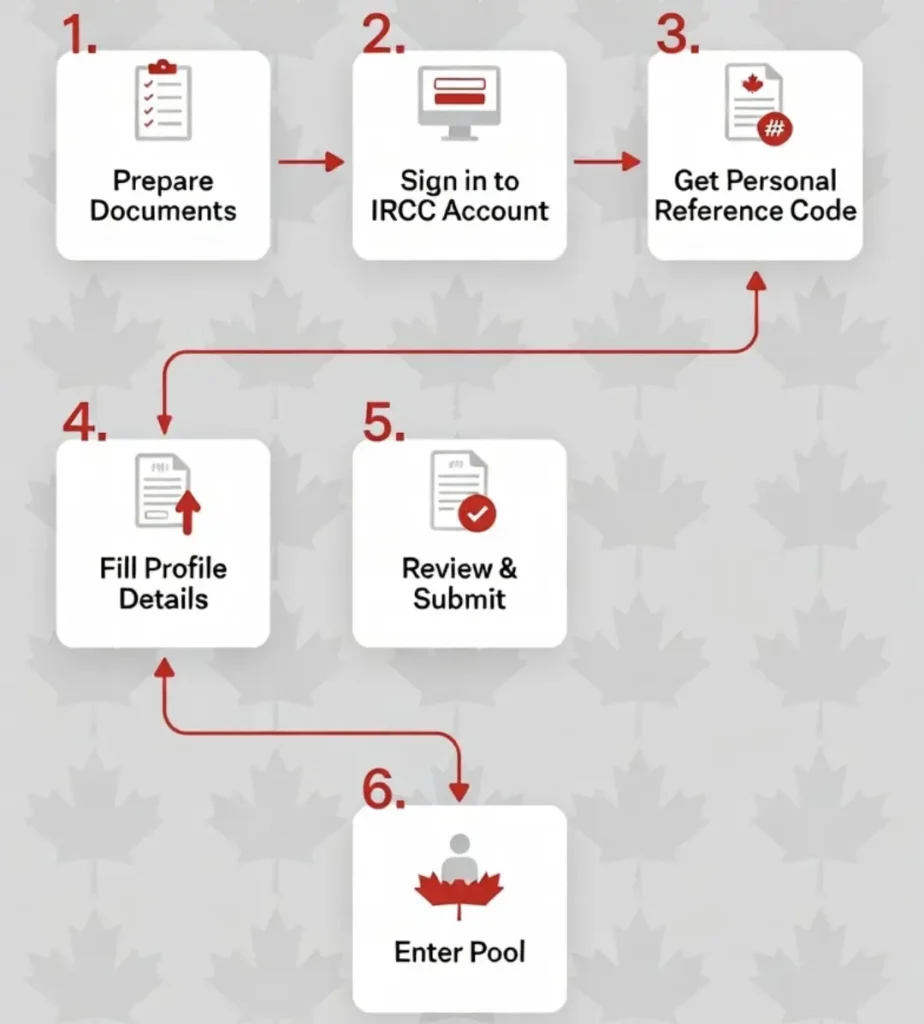
- Prepare all required documents.
- Sign in to your IRCC secure account (GCKey or Sign-In Partner).
- Complete the eligibility questions (Come to Canada tool) to receive your personal reference code.
- Enter the reference code to start the profile.
- Fill in all sections carefully (personal details, education, work history, language, etc.).
- Review everything thoroughly.
- Submit the profile within 60 days.
You can save and return to the profile anytime.
Managing Your Profile While in the Express Entry Pool
How to Update Your Profile When You Get a Higher Language Score
Log into your account, select the profile, and update relevant sections. Add new test results to boost your score. The system recalculates CRS immediately. Updates do not change your original submission date for tie-breaking purposes.
What to Do If Your ECA, Passport, or Language Test Expires While Waiting
Monitor expiry dates closely. Update documents before they lapse to stay eligible. For expired items, submit new ones promptly. In some cases, you may need to create a fresh profile if too many changes accumulate.
Adding New Work Experience to Boost Your Automatic CRS Calculation
Document additional skilled work with proper reference letters. Update the work history section. Extra months or years can push you into higher point brackets, especially after reaching one or three years of experience.
How to Keep Your Profile Up-to-Date
You must update your profile whenever any of the following changes:
- New or improved language test results
- Change in job, new work experience, or job offer
- Marriage, divorce, or birth of a child
- New education credentials or ECA
- Change of address or contact information
- Passport renewal or expiry
Tip: Updates recalculate your CRS score instantly but do not change your original profile submission date for tie-breaker purposes.
Common Reasons Your Express Entry Profile May Become Ineligible
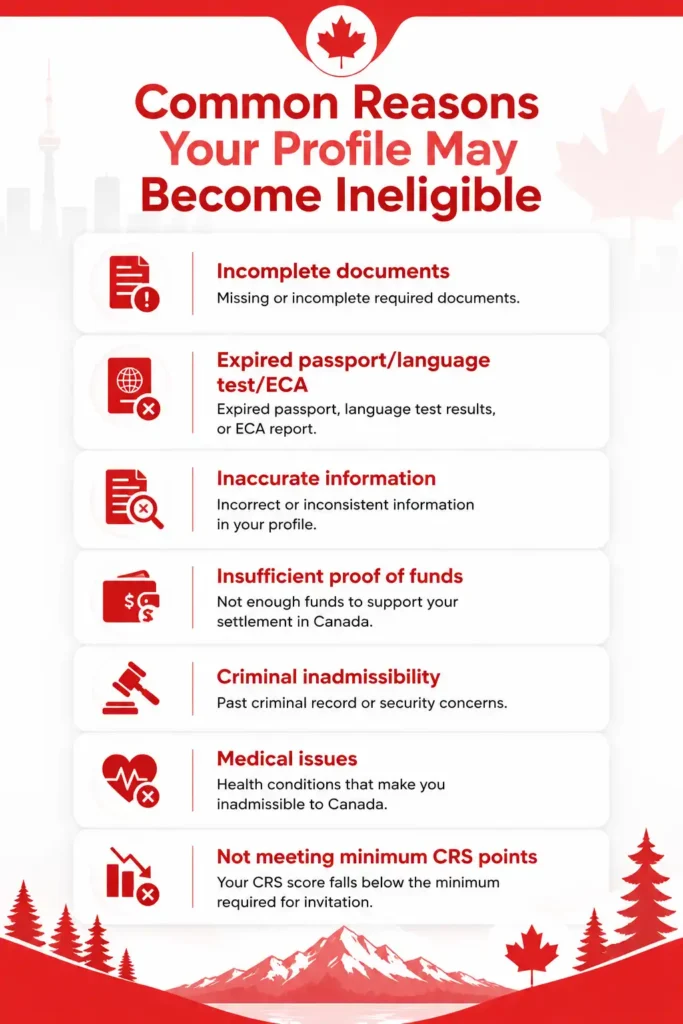
- Language test or ECA expires while in the pool
- Work experience no longer meets the minimum recency requirement
- Proof of funds falls below the required amount
- Change in primary occupation that affects eligibility
- Work permit expires without proper restoration (if living in Canada)
Regularly monitor all expiry dates to stay eligible.
What to Do While Waiting in the Pool
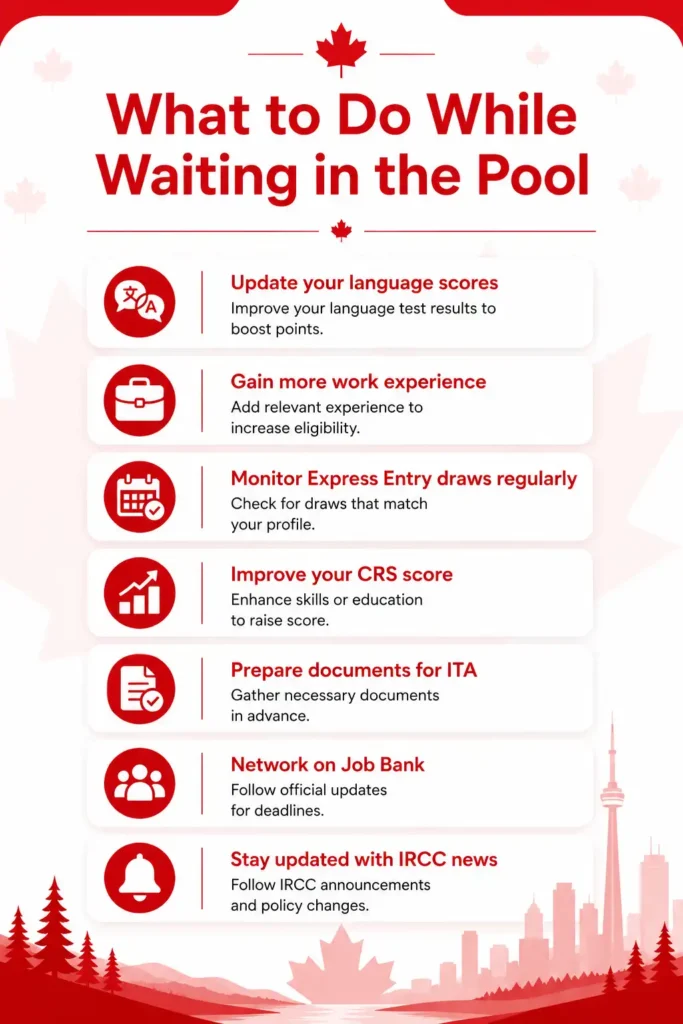
- Improve your CRS score (new language results, Canadian job offer, Provincial Nominee Program, etc.)
- Create a Job Bank account using your Job Seeker validation code
- Subscribe to IRCC email notifications
- Check your IRCC account regularly
- Continue gaining skilled work experience
Treating the waiting period as an active improvement phase significantly increases your chances.
Troubleshooting Common IRCC Portal System Errors
How to Fix the “System Timeout” or Form Freezing Issues
Save progress every few minutes. Use a stable internet connection and modern browser (Chrome or Edge recommended). Clear cache or try incognito mode if freezing occurs. Avoid peak hours if possible.
Resolving Validation Errors and Blank Dropdown Glitches
Double-check spelling and format for dates and numbers. Refresh the page or log out and back in. For persistent dropdown issues, try a different device. Contact IRCC web form support with screenshots if problems continue.
Frequently Asked Questions About Express Entry Profile Creation
1. How long does it take for my profile to become active in the pool?
Once submitted successfully, your profile enters the pool right away. You can check your status in the account dashboard.
2. Can I create an Express Entry profile without a job offer?
Yes. A job offer helps but is not mandatory for most candidates. Many enter the pool without one and improve their score later.
3. What happens if I make a mistake after submitting my profile?
You can update most sections yourself. For major errors, contact IRCC through the web form with supporting evidence.
4. Is there a fee to create or submit the Express Entry profile?
No fee applies at the profile stage. Fees come only when you receive an Invitation to Apply and submit the full permanent residence application.
5. How often are draws held and how long should I wait in the pool?
Draws occur regularly, sometimes weekly. Wait times vary based on your CRS score and category. Check your account frequently for updates.
6. Can I have more than one Express Entry profile at the same time?
IRCC generally allows only one active profile. Submitting multiple can lead to complications.
Tracking the Next Express Entry Draw After Going Live
A complete and accurate Express Entry profile positions you to compete effectively. Stay proactive by monitoring your CRS score, updating documents promptly, and exploring ways to strengthen your application such as language improvement or provincial interest.
Many candidates succeed by treating the pool period as an active phase rather than passive waiting. With careful preparation and ongoing attention, this process can lead to the Invitation to Apply and, ultimately, permanent residency in Canada.
Keep all records organized and check the official IRCC website regularly for any policy updates.
About The Author