

Express Entry remains one of the most popular pathways for skilled workers seeking permanent residence in Canada.
Many applicants get confused about key identifiers like the Express Entry file number, profile number, and Job Seeker validation code.
This detailed guide explains everything clearly and helps you navigate the process without frustration.
What is an Express Entry File Number?
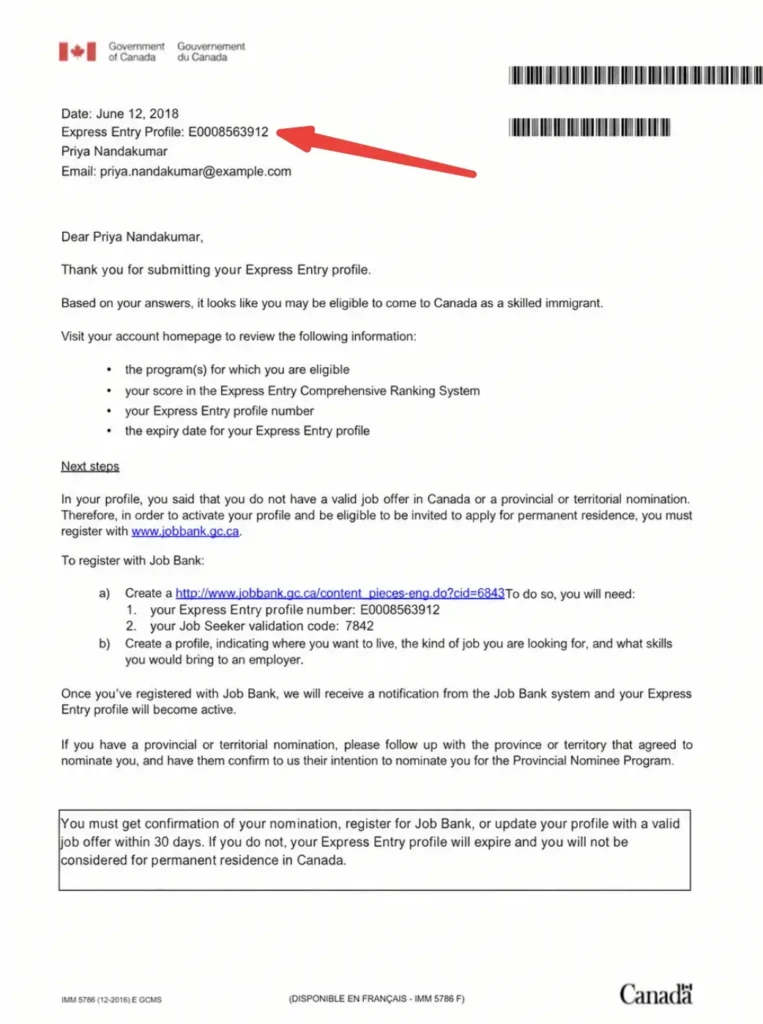
The Express Entry file number, more commonly referred to as the Express Entry profile number, is a unique identifier assigned to your profile after successful submission into the Express Entry pool. It typically starts with the letter “E” followed by nine digits (for example: E0008563912).
This number serves as your official reference for:
- Job Bank registration
- Provincial Nominee Program (PNP) applications
- Updating your profile
- Communication with Immigration, Refugees and Citizenship Canada (IRCC)
It is not the same as an Application Number (which is issued only after you receive an Invitation to Apply and submit your full PR application). The profile number identifies your entry in the candidate pool before any invitation is received.
Example of Express Entry File Number
An Express Entry file number always follows a standard format. Here is a realistic example:
E0008563912
This is what a typical Express Entry file number looks like. It begins with the letter E, followed by exactly nine digits. Every candidate receives a unique combination, and this number stays with your profile throughout the entire Express Entry process.
Express Entry Profile Number Sample Photo:
Where to Find Your Express Entry Profile Number
Once your profile is submitted, IRCC sends a confirmation message. Here is the exact step-by-step process to locate it:
- Log in to your IRCC secure account.
- Go to “View my submitted applications or profiles”.
- Click on “Check status and messages”.
- Scroll down to the Correspondence table.
- Find the message titled something like “Express Entry profile confirmation” or “Welcome to Express Entry”.
- Open the attached PDF letter.
- Your profile number appears at the top of the letter.
- The Job Seeker Validation Code is listed under the Job Bank registration section.
Always keep a screenshot or digital copy of this PDF for future reference.
When Will You Get Your Express Entry Profile Number?
You receive your Express Entry profile number immediately after successful submission of your profile. In most cases:
- The confirmation message and PDF appear in your account within a few minutes to 24 hours.
- Your profile enters the Express Entry pool right away.
- Your Comprehensive Ranking System (CRS) score becomes visible shortly after submission.
If you do not see the message after 48 hours, check your account spam/junk folder or ensure you submitted a complete profile. Technical glitches occasionally delay visibility, but they are usually resolved quickly.
Is Express Entry File Number and Profile Number the Same?
Yes, they refer to the same thing.
IRCC and many applicants use the terms “Express Entry file number,” “profile number,” and “Express Entry number” interchangeably. All point to the same unique identifier that starts with “E”.
This is different from:
- UCI (Unique Client Identifier): Your permanent client ID (8 or 10 digits).
- Application Number: Issued only after you submit a full PR application following an ITA.
- Personal Reference Code: Used only during initial profile creation.
How to Get an Express Entry Profile Number
Here is the complete process to obtain your profile number:
- Check Eligibility: Use the Come to Canada tool or directly create a profile if you meet minimum requirements (skilled work experience, language proficiency, education, etc.).
- Create IRCC Secure Account: If you don’t have one, register on the official IRCC website.
- Start Your Profile: Go to the Express Entry section and begin the profile builder. You can use a Personal Reference Code if you completed the eligibility tool.
- Fill All Sections Carefully:
- Personal information
- Contact details
- Education history
- Work experience (with correct NOC codes)
- Language test results
- Family information
- Review and Submit: Double-check everything before final submission. Once submitted, you cannot make major changes easily.
- Receive Confirmation: Your profile number and Job Seeker Validation Code will be issued in the confirmation message.
Important Tips:
- Be accurate with dates, job titles, and NOC codes, errors can lead to profile rejection.
- Upload clear scans of required documents (though full documents are not needed at profile stage).
- Your profile remains valid for one year from submission.
Common Mistakes to Avoid
- Using someone else’s profile number or validation code (they are unique and non-transferable).
- Copy-pasting codes (hidden characters can cause errors, type them manually).
- Waiting too long to register on Job Bank after receiving credentials.
- Forgetting to update your profile before it expires.
Why These Numbers Matter
Your Express Entry profile number and Job Seeker Validation Code are essential for:
- Accessing Job Match services on Job Bank
- Applying to certain Provincial Nominee Programs
- Proving your candidacy during job applications to Canadian employers
- Updating personal information with IRCC
Keeping these details safe and organized speeds up your entire immigration journey.
Final Advice
The Express Entry system rewards preparation and accuracy. Once you receive your profile number, take immediate action: register on Job Bank, start networking with Canadian employers, and continue improving your CRS score through language tests, education credentials, or Canadian work experience.
For the most up-to-date information, always refer to the official IRCC website, as processes can change. If your profile is found ineligible upon submission, you will need to create a new one after addressing the issues.
Start your journey today by creating a strong, error-free Express Entry profile, your profile number is the first official step toward permanent residence in Canada.
This guide provides clear, actionable information for anyone navigating the Express Entry system in 2026. Understanding these key numbers helps avoid common delays and keeps your application on track.
Follow me on WhatsApp for latest Express Entry Draw updates and Canada Immigration News. You can even bookmark our Express Entry Tracker 2026 page for latest draws, CRS Scores, and Complete express entry draws history.
About The Author